
tradjs serve runs an editable app. tradjs build followed by tradjs start runs the production artifact. They should not be treated as the same program with a different error color. Development replaces server-side module registries after a source edit and rebuilds affected route and browser assets. Production uses the built assets and hides internal error details.
A useful test of a development server is not whether it reloads the first page after saving. Change an imported database helper, change a client entry, introduce broken TypeScript, repair it, and repeat enough times to see whether old copies are retained. The 4.7.0 development runner was built to cover that sequence.
One module graph for each revision#
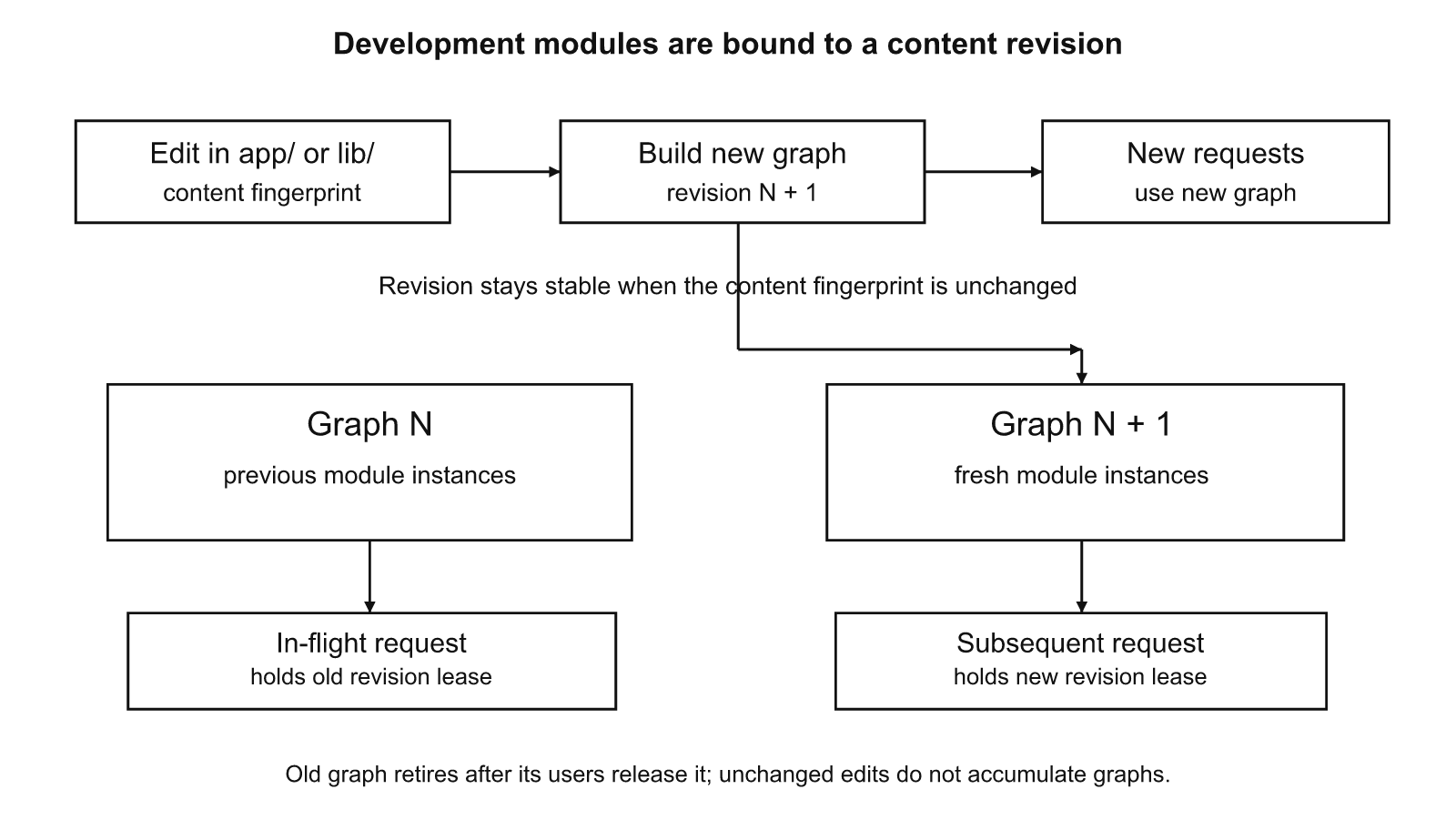
Bun caches modules by identity. Adding a cache-busting suffix to the page entrypoint is not enough: its import of db.ts may still resolve to a previously loaded module. TradJS instead leases a distinct Bun.ModuleGraph registry for each content revision. The code that determines the revision hashes the bytes of relevant source files:
export function developmentFingerprint(appDir: string): string {
  const projectRoot = existsSync(path.join(appDir, "package.json"))
    ? path.resolve(appDir) : path.dirname(path.resolve(appDir));
  const hash = createHash("sha256");
  function scan(dir: string): void {
    if (!existsSync(dir)) return;
    for (const entry of readdirSync(dir, { withFileTypes: true }).sort((a, b) => a.name.localeCompare(b.name))) {
      if (IGNORED.has(entry.name) || entry.isSymbolicLink()) continue;
      const file = path.join(dir, entry.name);
      if (entry.isDirectory()) scan(file);
      else if (entry.isFile() && SOURCE.test(entry.name)) {
        hash.update(path.relative(projectRoot, file)).update("\0");
        hash.update(readFileSync(file)).update("\0");
      }
    }
  }
  scan(appDir);
  if (path.resolve(appDir) !== projectRoot) {
    for (const entry of readdirSync(projectRoot, { withFileTypes: true })) {
      if (entry.isFile() && SOURCE.test(entry.name)) {
        hash.update(entry.name).update("\0").update(readFileSync(path.join(projectRoot, entry.name)));
      }
    }
  }
  return hash.digest("hex");
Source: src/server/dev-runtime.ts, lines 24–48.
The scanner orders directory entries, includes relative names and their bytes in a SHA-256 digest, and skips generated and dependency folders. It also scans source files in the project root when the route directory is its child. The fingerprint does not depend only on file modification times, so rapid successive edits and same-length replacements are visible. Changing a filename also changes the digest. The scan is synchronous; its cost grows with the amount of source in the watched project. Keep large generated bundles outside the watched source tree.
The graph manager handles in-flight requests as leases:
  get revision() { return this.changes; }
  /** Lease a graph for a request. An in-flight request pins the old graph. */
  async run<T>(action: (load: (file: string) => Promise<any>) => Promise<T>): Promise<T> {
    const next = developmentFingerprint(this.appDir);
    if (!this.current || this.fingerprint !== next) {
      const graph = this.createGraph();
      const old = this.current;
      this.current = { graph, users: 0, retired: false };
      this.fingerprint = next;
      if (old) {
        ++this.changes;
        this.invalidate();
        old.retired = true;
        if (old.users === 0) old.graph.dispose();
        console.log(`[tradjs] Development files changed (revision ${this.changes}); routes and assets invalidated`);
        if (typeof Bun.gc === "function") Bun.gc(false);
      }
    }
    const version = this.current;
    ++version.users;
    try {
      return await version.graph.run(() => action((file) => version.graph.import(file)));
    } finally {
      --version.users;
      if (version.retired && version.users === 0) version.graph.dispose();
    }
  }
  dispose(): void {
    if (this.current) {
      this.current.retired = true;
      if (this.current.users === 0) this.current.graph.dispose();
    }
    this.current = undefined;
  }
}
Source: src/server/dev-runtime.ts, lines 77–112.
On a different fingerprint, the manager allocates a new graph and invalidates the router's caches. Existing requests finish on the old graph. Once an old graph has no users, it is disposed, releasing its module state and associated resources. The code also requests garbage collection after a change when Bun exposes it. It does not promise that application-created global state is isolated: module graphs share globalThis. In this Bun version TradJS explicitly installs its host <Head> collector in that shared global so a page loaded in a separate graph can still populate the response head.
A request may complete on the old code if it started before the edit. The next request leases the new graph. This is deliberate. A half-rendered page must not switch imported implementations in the middle of a request.
What a save changes#
| Edited file | What the next request sees | Browser effect |
|---|---|---|
app/page.tsx |
New page module | Navigate or reload to see new SSR HTML |
app/layout.tsx |
New layout module | Next HTML contains changed shell |
app/middleware.ts |
New middleware module | New checks and locals on the next request |
db.ts |
New imported dependency within the new graph | Server-rendered output reflects helper changes |
app/page.client.tsx |
New browser bundle and asset URL | Fresh page mounts the new client code |
app/globals.css |
Rebuilt style output and URL | Fresh page uses the changed CSS |
Added app/api/.../route.ts |
Newly discovered route | Requests can reach the added handler |
| Removed route file | Route cache invalidated | Next request returns 404 |
These are the behaviors exercised by scripts/dev-e2e.ts. Development uses a real browser navigation for its checks, not a promise that hot state is preserved inside the current DOM. A fresh HTML request carries the current client and stylesheet addresses. A direct request for a previously cached client bundle is also checked against the changed source: the old URL cannot quietly return stale bytes after an edit. No special client-state-preservation contract is implied. |
||
The distinction is important for a Next.js developer expecting hot component replacement. TradJS favors normal page navigation and disposable client mounts. Editing page.client.tsx rebuilds the browser entry; reloading the document mounts it again. The mount function must return cleanup for its own timers, listeners, fetches and sockets. The notes starter demonstrates this through its pagehide cleanup and persisted pageshow remount. |
Four failure surfaces#
A syntax failure in app/page.tsx prevents the module from loading. A request for the page returns HTTP 500 with a development diagnostic identifying the file and line, and the server terminal receives the error. Correct the source and request the page again. The process does not need a restart. This is different from a syntax mistake in a production build, where the build must be corrected before deployment.
A render failure occurs after a module has loaded. The development error page includes the thrown message, stack information and a source location. For example, the browser runner injects DEV_RENDER_THROW into the page function. The response is still a failed request, not a partial success with a missing component. The corresponding terminal output records the failure. Restoring the function lets a subsequent request render normally. A layout throw is tested independently because an error may occur outside the page function itself.
The error page is made by the server, not injected by React or a browser extension. The renderer's development/production branch is visible in this source:
function renderGenericErrorPage(
  error: unknown,
  viewTransitions: boolean,
  dev = isDev,
): string {
  const value = error as any;
  const message = value?.message || String(error);
  const stack = sourceLocations(error) || value?.stack || message;
  const detail = dev ? stack : "Internal Server Error";
  return injectViewTransitions(
    `<!DOCTYPE html><html><head><meta charset="utf-8"><meta name="viewport" content="width=device-width, initial-scale=1"><title>500 - Internal Server Error</title></head><body style="margin:0;background:#120f12;color:#fff;font:14px/1.5 ui-monospace,SFMono-Regular,Menlo,Consolas,monospace"><main style="padding:24px;max-width:1200px;margin:0 auto"><h1 style="color:#ff6b6b">500 - Internal Server Error</h1><p>${escapeHtml(dev ? message : "The request could not be rendered.")}</p><pre style="white-space:pre-wrap;word-break:break-word;background:#1d171d;border:1px solid #3a2c3a;border-radius:8px;padding:16px;overflow:auto">${escapeHtml(detail)}</pre></main></body></html>`,
    viewTransitions,
  );
}
Source: src/server/app-router.ts, lines 402–415.
A failing browser initializer has a different surface. The server may have returned valid HTML and JavaScript, but the client mount throws while executing in the browser. TradJS shows an in-page #__tradjs-error-overlay, with the original page.client.tsx source location recovered from the bundle source map, and reports the diagnostic back to the development terminal. The report endpoint only accepts a same-origin development POST. Restoring the initializer and reloading removes the overlay. The production app does not expose this development reporting endpoint.
An API handler that throws also returns a development 500 page with file and line when requested as HTML. The browser runner creates app/api/dev-throw/route.ts, verifies the diagnostic, replaces the thrown handler with one returning JSON, and then verifies that the endpoint responds without a process restart. Deleting the file makes it disappear from route discovery. API clients should still handle failed HTTP responses as errors; the development HTML diagnostic is for the developer, not a stable machine-readable error schema.
| Failure | Browser or HTTP response | Terminal | Recovery |
|---|---|---|---|
| Invalid page syntax | 500, filename and line |
Compile diagnostic | Fix source, request page |
| Thrown page or layout render | 500, message and stack |
Render stack | Fix source, request page |
| Browser mount exception | Overlay on otherwise loaded page | Client diagnostic and source location | Fix initializer, reload |
| Thrown API handler | 500 diagnostic for HTML request |
Route stack | Fix handler, retry API |
| Invalid CSS | 500 style/build diagnostic |
Build failure | Correct CSS, reload |
| The browser script deliberately introduces these defects. Errors caused by injected failures are expected in those cases; unrelated browser exceptions fail the run. The actual script captures a screenshot for each step and records the result in JSON and HTML reports. This matters because a visual overlay that does not disappear is not a successful recovery, even if the server still responds. |
The development browser contract#
The development runner builds a starter in a temporary directory, starts tradjs serve, attaches Chrome through CDP, edits files, navigates to real pages and observes network responses, DOM text and terminal output. Its step inventory is explicit: the first 25 calls to step are named, and the loop generates 50 additional edits. The grouping is as follows.
| Kind | Browser steps | What is checked |
|---|---|---|
| First render and client mount | 1 | HTML and counter initializer |
| Source, dependency, route and asset refresh | 9 | Page, layout, <Head>, CSS, client bundle, db.ts, middleware, restoration |
| Error presentation and recovery | 12 | Syntax, render, client mount, API, CSS, layout, continued service |
| Repeated edit/navigation loop | 50 | Fresh output after each distinct source edit |
| Memory observation, final restoration, report endpoint | 3 | RSS comparison, original starter, denied foreign error report |
| Total | 75 | 75 passed in the supplied run |
Source: scripts/dev-e2e.ts, calls to step and the loop; measured result supplied with the repository. |
||
| The recorded run on Windows 11 with Bun 1.4.3 passed 75 of 75 steps, including the 50-edit sequence. Its reported server memory moved from 197 MiB to 189 MiB. That observation rejects a leak claim for this run; it does not establish a memory bound for arbitrary application modules, import graphs or traffic. The runner includes an internal memory-growth assertion and collects samples during the edit loop. Its cross-platform RSS code uses Windows process data on that system. | ||
A practical regression run is bun scripts/dev-e2e.ts --deps local from the repository root, after installing the dependencies and providing Chrome. The script uses a temporary starter and writes a report. If Chrome is not discovered, configure the environment as the script describes. Inspect the individual failures and screenshots rather than treating the summary count as sufficient evidence. |
Development security differs from production#
Errors in production must not disclose source paths, stacks or private values. The same generic error renderer substitutes Internal Server Error for the diagnostic details when development mode is disabled. The framework's custom error page behavior is separate from source-map and terminal reporting.
Development diagnostics are useful because they disclose details. Run the development listener on a trusted machine or a restricted network. Do not expose it as the public application server. The diagnostics include local file locations, and client errors are transmitted to a development-only reporting route for terminal output. The guard on that route rejects a foreign origin and oversized reports; a public error intake is not part of the production interface.
When changing configuration, distinguish a render change from a compiled asset change. HTML and client bundles are not one cache. A page can render with new data but point to an old script if the framework does not invalidate both sides. The development runner explicitly checks a stale asset URL before fetching new HTML, and tests a same-length client edit. Both checks make a content fingerprint more valuable than a file timestamp.
Check an upgrade before the first run#
tradjs upgrade-check is a static scan of an app directory. It resolves app routes, parses source and configuration, and reports location-tagged errors and review findings. It does not execute modules or prerender pages. The command and output formats are documented in UPGRADING.md:
if (!command || command === "--help" || command === "-h") {
  console.log(`
🦊 tradjs — Bun-native web framework
Usage:
  bunx tradjs init [dir] [--template minimal|app]   Scaffold a project
  bunx tradjs init .                Create in current directory
  bunx tradjs serve                 Run ./app or route files in the current directory
  bunx tradjs start                 Serve with NODE_ENV=production
  bunx tradjs upgrade-check [dir] [--json] [--fix]   Audit 4.7.0 migrations
  bunx tradjs build                 Build all routes & assets to disk
  bunx tradjs build --outdir ./out  Build to custom output directory
  bunx tradjs build --entry <file>  Build specific entry points
Serve options:
  [port]               Explicit port (busy ports throw)
  --host <name>        Interface to listen on (default: all interfaces)
  --appdir <dir>       App directory (default: ./app, then route files in .)
  --unix <path>        Unix socket path
  --distdir <dir>     Production build directory for start (default: sibling dist/)
  --trust-proxy <n|loopback|CIDR[,CIDR]>  Trust only these proxy hops/addresses
  --shutdown-timeout <ms>   Drain deadline on SIGTERM/SIGINT (default: 10000)
  --health-path <path>      Health route (default: /__tradjs/health)
  --no-health               Disable built-in health route
Build options:
  --outdir <dir>     Output directory (default: ./dist)
  --appdir <dir>     App directory for route discovery (default: ./app)
  --css <file>       Global CSS file to process
  --entry <file>     Entry point to build (repeatable)
Options:
  --help, -h         Show this help message
`);
  process.exit(0);
}
Source: bin/tradjs.ts, lines 4–39.
Run the check before upgrading an existing app. Use --json for CI and --fix only for the supported dependency metadata and JSX configuration edits. An error finding has exit status 1; review-only findings leave status 0. An invalid invocation has status 2. The human-readable report groups repeated review findings so the terminal is not flooded by one repeated JSX pattern, while JSON retains individual locations.
The supplied upgrade-checker run covered 73 real apps. An attribute without a value crashed an earlier scanner on 21 of them. A directory containing 1 GB of bundled JavaScript drove the scanner to 15 GB; the repaired implementation reached a reported 280 MiB peak. The source now bounds individual read sizes, total scan bytes, file count and cached syntax trees:
 * A scan must stay small on any folder: an app directory can hold a gigabyte
 * of bundled JavaScript (browser profiles, vendored builds) that is not app
 * code. Files over the size limit are skipped and counted, never parsed.
 */
export const UPGRADE_LIMITS = { fileBytes: 512 * 1024, files: 20_000, totalBytes: 256 * 1024 * 1024, cachedSources: 8 };
export interface UpgradeOptions { fix?: boolean }
const CODE_EXT = /\.[cm]?[jt]sx?$/i;
const SKIP_DIRS = new Set(["node_modules", "dist", "out", ".git", ".tradjs", ".next", "coverage", "vendor", "build", "tests", "test", "fixtures", ".cache"]);
const ROUTE_EXT = /\.(?:tsx?|jsx?)$/i;
const UNSAFE_WRITE = new Set(["POST", "PUT", "PATCH", "DELETE"]);
Source: src/cli/upgrade-check.ts, lines 32–41.
The scanner explicitly reports skipped sources. Silence therefore cannot mean the contents of an oversized skipped bundle are safe. For a migration involving cookies, prerendering, WebSockets or proxies, follow a clean scan with a production build and browser smoke tests. The command cannot infer what a reverse proxy will forward in service or prove that arbitrary database queries contain no visitor-specific data.
For an Express migration, keep an API route with a deliberate JSON contract and use development HTML only to diagnose errors in the browser. For a Next.js migration, treat a page.client.tsx initializer as a disposable browser module rather than a hot-preserved component tree. Both approaches are tested by making a real edit and issuing the next request, not by observing a file watcher log.