
The starter is designed around one durable SQLite file on one host. The app may have multiple Bun processes on that host, but a deploy does not become horizontally distributed merely because two servers can open the file. SQLite's write-ahead log uses coordination on the same machine and does not work as a shared database over an ordinary network filesystem (SQLite WAL). Plan storage, ingress and backup before choosing a runtime command.
TradJS ships a deploy kit in templates/app/deploy/: a multistage Dockerfile, Compose, a Caddyfile, a systemd service and an nginx configuration. These are reference configurations, not claims that the DNS record or certificate has been installed. The deployment checker validates important relationships among those files without starting Docker or a listener.
Choose the ingress path#
| Route | Public listener | Bun listener | Proxy trust | SQLite path |
|---|---|---|---|---|
| Docker Compose + Caddy | Caddy on host HTTP/HTTPS | app:3000 on private Compose network |
--trust-proxy 1 |
/app/data/app.sqlite in named volume |
| Host Bun under systemd | Host Caddy or nginx terminates TLS | 127.0.0.1:3000 |
--trust-proxy loopback |
/srv/tradjs/data/app.sqlite |
| Existing nginx site | Existing nginx terminates TLS | 127.0.0.1:3000 |
--trust-proxy loopback |
Project data/app.sqlite |
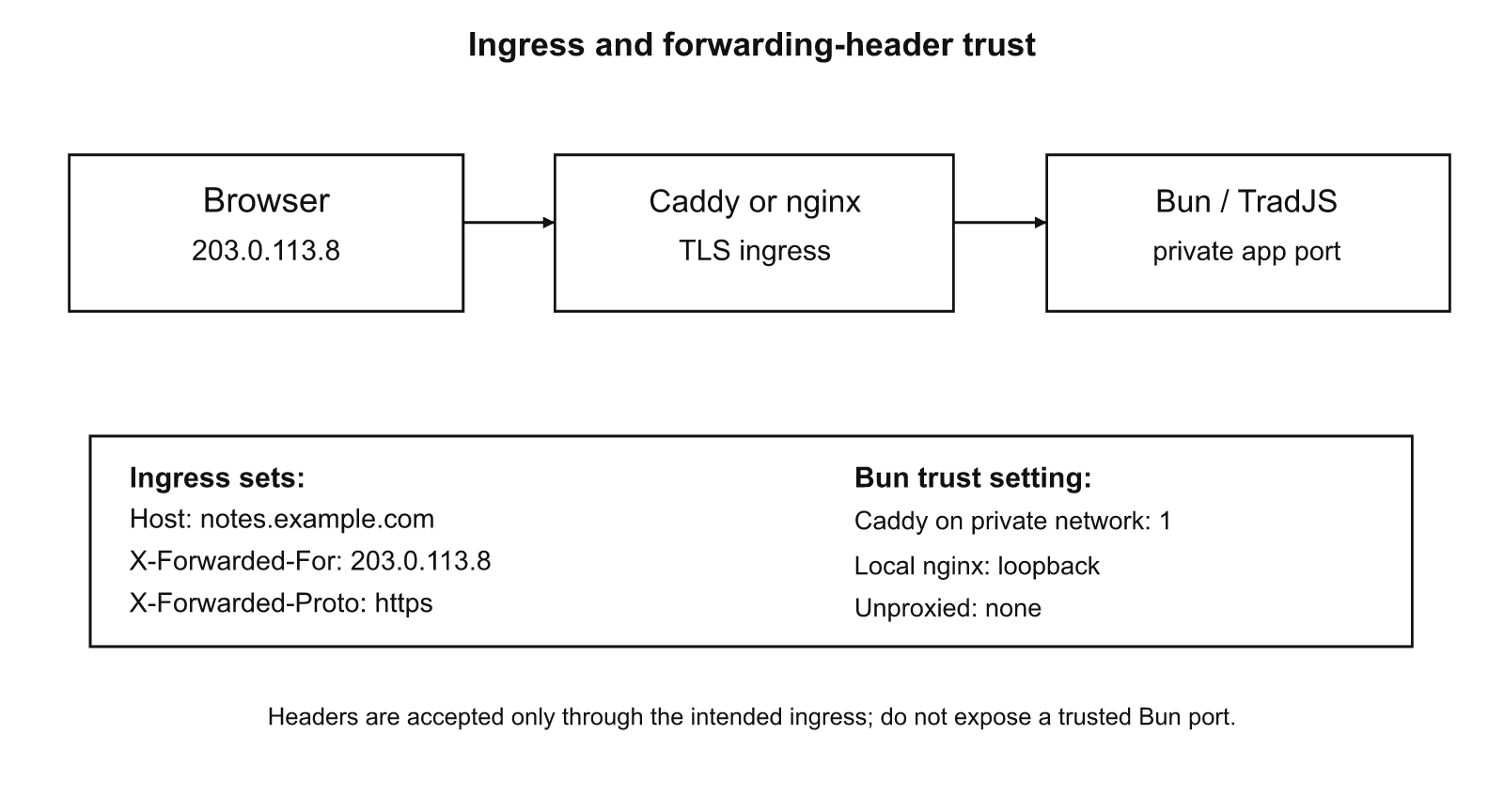
| A trust setting is not a request-header preference. It says which socket peers are allowed to speak for the public origin. The default without trust is to ignore forwarding headers. A numeric count trusts that many hops immediately upstream, even if the socket peer is a direct Internet client. Only use it where the Bun port is inaccessible except through the known proxy. | ||||
 |
Docker with Caddy#
Initialize the app with bunx tradjs init notes --template app, install the app dependencies and set SITE_DOMAIN=notes.example.com to the DNS name routed to the machine. In the generated project, run docker compose -f deploy/docker-compose.yml up --build -d. The service definition is shipped with the starter:
services:
  app:
    build:
      context: ..
      dockerfile: deploy/Dockerfile
    restart: unless-stopped
    expose:
      - "3000"
    volumes:
      - notes_data:/app/data
    networks:
      - private
  caddy:
    image: caddy:2
    restart: unless-stopped
    depends_on:
      app:
        condition: service_started
    ports:
      - "80:80"
      - "443:443"
    environment:
      SITE_DOMAIN: ${SITE_DOMAIN:-localhost}
    volumes:
      - ./Caddyfile:/etc/caddy/Caddyfile:ro
      - caddy_data:/data
      - caddy_config:/config
    networks:
      - private
volumes:
  notes_data:
  caddy_data:
  caddy_config:
networks:
  private:
Source: templates/app/deploy/docker-compose.yml, lines 1–37.
Caddy exposes the public ports; the app has expose on the private network but no published host port. The Dockerfile builds the application and runs the production command as the non-root Bun user. The named notes_data volume keeps the database outside the container's ephemeral filesystem. Persist that volume and back it up before replacing the machine.
The forwarding header policy is explicit:
{$SITE_DOMAIN} {
    encode gzip
    reverse_proxy app:3000 {
        # Overwrite, never append user-supplied forwarding headers.
        header_up Host {http.request.host}
        header_up -Forwarded
        header_up X-Forwarded-For {remote_host}
        header_up X-Forwarded-Proto {scheme}
        header_up X-Forwarded-Host {http.request.host}
        # WebSocket Upgrade and Connection are managed by Caddy.
    }
Source: templates/app/deploy/Caddyfile, lines 1–11.
Take a client at client-ip connecting by HTTPS to notes.example.com. Caddy connects to the app across the private network, for example from socket peer caddy-ip. The request that reaches Bun has Host: notes.example.com, X-Forwarded-For: client-ip, X-Forwarded-Proto: https, and X-Forwarded-Host: notes.example.com; any incoming Forwarded is removed. Under --trust-proxy 1, TradJS may walk from that immediate Caddy peer to the asserted browser address and reconstruct https://notes.example.com. Its same-origin checks and Secure cookie decision use that public origin.
The addresses are documentation examples, not observed addresses from a running container. Real private peer addresses depend on the Compose network. Confirm the external URL and the forwarding chain through the actual ingress. If the app port is published to the Internet, --trust-proxy 1 becomes unsafe because a direct client can send the same header set. Keep the private network private.
The Caddyfile includes gzip and automatically forwards WebSocket upgrades as part of reverse_proxy. Verify that a browser can open /api/notes/live as wss: over the public domain. Connecting to the internal ws: URL from outside should not be part of the deployment.
Host service with systemd#
A host installation uses the generated app at /srv/tradjs. Install Bun and dependencies, build once with bun run build, create /srv/tradjs/data owned by the unprivileged service account, and install the unit under /etc/systemd/system/. Enable it through systemctl after reviewing the installed Bun path and filesystem permissions.
[Unit]
Description=TradJS notes starter
After=network.target
[Service]
Type=simple
User=tradjs
Group=tradjs
WorkingDirectory=/srv/tradjs
Environment=NODE_ENV=production
ExecStart=/usr/local/bin/bun /srv/tradjs/node_modules/tradjs/bin/tradjs.ts start 3000 --host 127.0.0.1 --trust-proxy loopback
Restart=on-failure
RestartSec=2s
TimeoutStopSec=15s
KillSignal=SIGTERM
NoNewPrivileges=true
PrivateTmp=true
ProtectSystem=strict
ProtectHome=true
ReadWritePaths=/srv/tradjs/data
[Install]
WantedBy=multi-user.target
Source: templates/app/deploy/tradjs.service, lines 1–23.
The unit starts TradJS on the loopback interface, not the host's public network address. --trust-proxy loopback limits header authority to a verified loopback peer, unlike a numeric hop count. It also requests production mode, restarts after failure and restricts writes to the data directory. ProtectSystem=strict requires that all other runtime paths needed by the app be readable without writes. Review custom file uploads, log destinations and temporary-file paths before adopting that restriction unchanged.
Place host Caddy or nginx in front of the unit. For HTTPS input from client-ip, the local proxy's socket peer is 127.0.0.1 as seen by Bun. After header overwrites, X-Forwarded-For: client-ip, X-Forwarded-Proto: https, and X-Forwarded-Host: notes.example.com are authoritative only because the peer is loopback. The resolved client has IP client-ip and origin https://notes.example.com. From an untrusted non-loopback peer, those header values would not be promoted to authority.
The systemd unit has a stop timeout of 15 seconds. TradJS's default graceful drain is 10 seconds. The unit's deadline needs to exceed the app's intended drain and cleanup period; if the application changes its timeout, review the service timeout as well. Logs go to the service manager unless the app explicitly sends them elsewhere.
Behind an existing nginx#
The shipped nginx file is a reference for the third route. It forwards HTTP traffic to loopback, preserves WebSocket upgrades and overwrites incoming forwarding metadata:
# Example for a host-installed nginx in front of the systemd service.
# Configure TLS (listen 443 ssl; ssl_certificate and ssl_certificate_key)
# before opening this site to the public.
map $http_upgrade $connection_upgrade {
    default upgrade;
    '' close;
}
server {
    listen 80;
    server_name _;
    location / {
        proxy_pass http://127.0.0.1:3000;
        proxy_http_version 1.1;
        proxy_set_header Host $http_host;
        proxy_set_header Forwarded "";
        proxy_set_header X-Forwarded-For $remote_addr;
        proxy_set_header X-Forwarded-Proto $scheme;
        proxy_set_header X-Forwarded-Host $http_host;
        proxy_set_header Upgrade $http_upgrade;
        proxy_set_header Connection $connection_upgrade;
        proxy_read_timeout 3600s;
    }
}
Source: templates/app/deploy/nginx.conf, lines 1–25.
The sample listens on plain HTTP and explicitly says to configure TLS before public use. Do not install it as the final public TLS site without changing the listen and certificate directives. Once nginx terminates HTTPS, $scheme becomes https for those requests. $remote_addr is the address of the client directly connected to nginx. $http_host is the received host and must also be constrained by a correct nginx virtual-host/DNS configuration. TradJS validates authority syntax, but that is not a domain ownership check.
Suppose an outside browser at client-ip sends Forwarded: for=forged-ip;proto=http;host=evil.example and an X-Forwarded-For: forged-ip. Nginx removes Forwarded and writes X-Forwarded-For from $remote_addr, yielding client-ip. It writes X-Forwarded-Proto: https from the actual TLS listener and X-Forwarded-Host: notes.example.com from the allowed vhost. Bun sees a loopback peer. --trust-proxy loopback resolves the correct public origin instead of accepting the forged client-provided chain.
If an upstream CDN connects to nginx, $remote_addr may instead be the CDN's address. The provided config chooses that verified immediate client, not the unverified IP originally claimed in a CDN header. Recovering the original visitor requires explicit trusted-CDN configuration at nginx and a topology review. Do not add X-Forwarded-For by appending incoming values without authenticating the upstream. RFC 7239 specifies header syntax and chained proxies, not the network policy that makes any hop trustworthy.
For a proxy on another private network, the alternative is a CIDR list that matches the actual proxy socket peer, such as the CIDR capability in src/server/trust-proxy.ts. Bind Bun to that private interface and use ingress rules to prevent direct access. A mismatch between trustProxy, the actual peer and forwarded fields can make HTTPS look like HTTP, break WebSocket origin matching and omit Secure on cookies.
Readiness, shutdown and health#
GET /__tradjs/health is built into the server. It returns 200 after the router is ready and 503 before readiness or while shutting down. It supports HEAD, rejects other methods and sends Cache-Control: no-store. It is an application readiness signal, not a database integrity test or a proof of public TLS reachability.
/** A listener-free version of the framework health route for crafted-request tests. */
export function healthResponse(
  req: Request, path: string | false, ready: boolean, shuttingDown: boolean,
): Response | undefined {
  if (path === false || new URL(req.url).pathname !== path) return undefined;
  if (req.method !== "GET" && req.method !== "HEAD")
    return new Response("Method Not Allowed", { status: 405,
      headers: { "Allow": "GET, HEAD", "Cache-Control": "no-store" } });
  const healthy = ready && !shuttingDown;
  return new Response(req.method === "HEAD" ? null : healthy ? "ok" : "unavailable", {
    status: healthy ? 200 : 503,
    headers: { "Cache-Control": "no-store", "Content-Type": "text/plain; charset=utf-8" },
  });
}
Source: src/server/graceful-shutdown.ts, lines 92–106.
The Dockerfile's HEALTHCHECK requests this endpoint locally and fails if it cannot get HTTP 200. An upstream monitor should additionally check the public HTTPS host and a representative authenticated request. Do not expose detailed stacks or configuration through the health response.
On SIGTERM or SIGINT, TradJS closes active WebSockets with 1001, stops accepting new work, and waits for in-flight requests within the shutdown deadline. If the deadline expires, outstanding connections are forcibly stopped. A second signal forces an immediate exit. The controller's ordering is visible in src/server/graceful-shutdown.ts and the integration tests in tests/graceful-shutdown.test.ts. Browser sockets will reconnect using the schedule from chapter 12; on a server that has been replaced, the revision snapshot resynchronizes the list.
A readiness probe will be unhealthy during the drain. That avoids sending new connections to a process that is already leaving service. Database write operations should still use transactions and application idempotency rules; draining an HTTP listener is not a substitute for handling client retries of uncertain POST outcomes.
Back up a live SQLite database#
A bare copy of app.sqlite while the process is writing is not a safe online backup. The file may have uncheckpointed data in app.sqlite-wal. Even copying the WAL beside the main database can yield an inconsistent pair when the copy is taken across active writes. SQLite documents the failure modes in How To Corrupt An SQLite Database File.
The supported online methods include the SQLite backup API and VACUUM INTO. Both produce a transactionally consistent copy of a live database. The backup API supports incremental copying with short source locks; VACUUM INTO makes a compact database copy. See SQLite Backup API and SQLite VACUUM. Choose an output path with free space and write permissions, outside the served public tree. Verify backups by opening the output, checking integrity, restoring it to a test location and exercising an application read.
The repository documents the host backup command:
sqlite3 /srv/tradjs/data/app.sqlite ".backup '/srv/tradjs/app-backup.sqlite'"
Source: README.md, lines 862–862.
The SQLite CLI .backup command uses the online backup facility. For the Compose volume, use Bun's bun:sqlite backup method inside the app container, then copy the completed output to the host:
docker compose -f deploy/docker-compose.yml exec -T app bun -e 'const {Database}=require("bun:sqlite"); await new Database("/app/data/app.sqlite").backup("/app/data/app-backup.sqlite")'
docker compose -f deploy/docker-compose.yml cp app:/app/data/app-backup.sqlite ./app-backup.sqlite
Source: README.md, lines 868–869.
The provided recipe writes its temporary backup inside the persistent data volume. Move the resulting verified copy to separate storage with an appropriate retention policy; a copy in the same named volume does not protect against loss of the underlying disk. Keep application credentials and backup access under an operator account.
An alternative is to run sqlite3 /srv/tradjs/data/app.sqlite "VACUUM INTO '/srv/tradjs/app-vacuum.sqlite';" as an operator with sufficient permissions. The target must not already contain a database. Treat this as an alternative snapshot procedure, not as a checkpoint command. SQLite notes that interrupted output and the filesystem's flush behavior matter for backup durability; validate the copy and move it to independent storage.
PRAGMA wal_checkpoint(PASSIVE); moves eligible WAL pages toward the main database without waiting indefinitely for readers. PRAGMA wal_checkpoint(TRUNCATE); can wait for readers and reduce a WAL file when appropriate. A checkpoint does not itself create a consistent backup copy, and it must not be followed by an unsafe live cp as though it froze writers. See SQLite checkpoint PRAGMA and WAL checkpointing. Never manually delete an active WAL file.
Size from the load run#
The supplied run is one snapshot: two processes, 200 authenticated sockets, 2,000 committed note writes, 10 updates for each user and aggregate RSS from 204 MiB to 220 MiB. The following rows are arithmetic, not projections to different traffic levels.
| Quantity | Arithmetic | Result |
|---|---|---|
| Average sockets per process | 200 ÷ 2 |
100 |
| Average writes per account | 2,000 ÷ 200 |
10 |
| Initial RSS per process, arithmetic mean | 204 ÷ 2 |
102 MiB |
| Final RSS per process, arithmetic mean | 220 ÷ 2 |
110 MiB |
| Aggregate change in RSS | 220 − 204 |
16 MiB |
| Change divided by socket count | 16 ÷ 200 |
0.08 MiB/socket |
| Change divided by write count | 16 ÷ 2,000 |
0.008 MiB/write |
| The final ratios are normalization of a single run, not marginal allocation costs. Memory includes the runtime, application, database caches and effects of the workload. There is no measured throughput, tail latency, disk-use trend or maximum supported concurrency in that run. Do not multiply these ratios by a planned user count to choose RAM. | ||
| For a first production size, use the observed aggregate 220 MiB only as a lower-bound reference point for this exact exercised configuration, then leave room for operating system services, proxy, backup activity, SQLite cache and peak app work. Run the same load script with the actual database, pages and ingress on the deployment machine before setting a real resource limit. The cross-process test establishes that this design works with one shared local file; it does not establish a service-level capacity target. | ||
Before handing over the host, run bun scripts/deploy-check.ts against the scaffold, verify external HTTPS and WebSocket upgrades, inspect the real forwarding headers, confirm that the health route changes state during shutdown, and restore a fresh SQLite backup into an isolated test app. Treat the deployed proxy configuration and restored data as the evidence, not the presence of sample files. |